 Wage Ticker
Account
No sign-up, no login.
Real-time salary counter
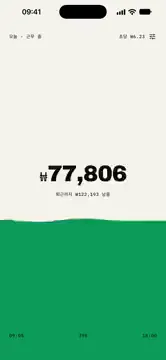
Just enter your salary and work hours. What you've earned so far today ticks up every second, and the screen fills like water as your day progresses. When you clock out, it's full.


No sign-up, no login.
No ads. The only notification is the leave-time reminder you turn on yourself.
Your salary and hours stay on your device.
Gross annual salary, workdays, clock-in/out. Hourly and per-second rates are calculated for you.
From clock-in it accrues at the per-second rate and stops at clock-out. Days off stay quiet.
Water rises with your day's progress; a drop falls every second and ripples the surface. The number flips as the water passes it.
Ticks up at your per-second rate
Past workdays × daily pay + today
This month's workdays at a glance in Settings
Set clock-in/out by spinning, in 5-minute steps
Counts down by the second under the amount while you work
Your work hours and where you are right now, at a glance
Shown after work and on days off; one slot fills for each workday
Tap a date in the Settings calendar to subtract it from your totals
Payday countdown and daily/monthly goal progress
Preview first, then send a single card
Widgets are here, on your Home Screen and Lock Screen. See today's earnings without opening the app, and the time left until you clock out ticking down by the second.
It's an estimate from your entered salary and hours (salary ÷ 52 weeks ÷ weekly hours). Taxes, allowances and actual attendance aren't reflected.
The whole span from clock-in to clock-out counts. Set an earlier clock-out time by the length of your break.
Set your workdays and hours accordingly and enter your expected annual income as the salary.
It stays on your device and is never sent to a server. Only anonymous usage statistics and crash reports are collected to improve the app.
1.5.0 · 2026-10-03
The time left until you clock out counts down by the second under the amount. New 24-hour band and week bars, and you can skip days off in the Settings calendar. Now supports 83 languages.